For technical support and documentation leads
Knowledge base or guided troubleshooting: what each one is for
Most manufacturers already publish their manuals online, and installers still ring. Why a library of correct documents is not the same as an answer, where a knowledge base is the right tool, and where a guided path does better.

Lingo
6 min read

Most manufacturers have already put their manuals online, often in a well-organised portal. The installers still ring. That is not because the documents are wrong. A knowledge base answers the question “where is it written down?”. An installer on site is asking a different one: “what do I do next?”.
In short
- A knowledge base is a library: it is built for finding and reading. Guided troubleshooting is a conversation: it is built for acting, one step at a time.
- In a Gartner survey, only 14% of service issues were fully resolved in self-service, and 36% of very simple ones. In 43% of failed attempts, customers could not find relevant content.
- Use a knowledge base for reference material. Use a guided path where the answer depends on what the installer sees and the order matters.
- They are not alternatives. The guides are built from the same documents, which stay the source of truth.
Two tools for two questions
Take an installer standing in front of a door controller showing a fault code. With a knowledge base, the work of getting from the code to the fix is theirs: search, choose a document, find the page, work out which variant they have, then piece together the steps. With a guided path, the same documentation does that work for them, one question at a time.
The same fault, two routes to the fix
Illustration
Knowledge base 6 steps, all done by the installer
- SearchTypes “E04” into the portal
- ChooseTwelve documents mention it
- OpenAn 86-page manual on a phone
- FindThe fault table on page 61
- DecideWhich of three variants is fitted?
- ActSteps on page 61, settings on page 34
Guided troubleshooting 5 steps, the guide asks
- AskSends “E04” in a message
- AnswerTaps “Single-phase”
- ActStep 1 of 3, for that variant
- ActStep 2, with the diagram
- DoneFixed, or passed to a person
Why correct documents still generate calls
Self-service rarely fails because the information is missing. Gartner surveyed 5,728 customers in December 2023 and found that only 14% of service issues were fully resolved in self-service. Even for issues the customers themselves described as very simple, the figure was 36%. In 43% of failed attempts, they could not find content relevant to their issue. These are customers across industries, not installers, but an installer with a fault code is in a harder position, not an easier one.
Most self-service attempts end somewhere else
Share of issues fully resolved in self-service
Even when the right page is found, it is rarely read in full. Jakob Nielsen’s analysis of real web browsing estimated that people read at most 28% of the words on an average page, and more likely about 20%. A manual written to be complete is long by design. Read in fragments, on a phone, in poor light, it is easy to miss the one line that says “on three-phase models only”.
The problem is not that the answer is missing. It is that the installer has to assemble it.
Where a knowledge base is the right tool
None of this makes a knowledge base a mistake. For reference material it is exactly right: a datasheet, a certificate, a parts list or a mounting drawing is something people want to find, look at and keep. The difference shows up in two things: whether the answer depends on what the installer can see, and whether the order of the steps matters.
Which tool suits which question
Two tests: does the answer depend on what the installer sees, and does the order matter?
Procedure
Follow it in order
One commissioning sequence for one product
Either; a guide keeps the place
Diagnosis
What is wrong, and what next?
Fault codes, a door that stops, a sensor that will not clear
Guided
Reference
Look it up
Dimensions, datasheets, certificates, parts lists
Knowledge base
Selection
Which one applies to me?
The parameter for this variant and this use
Guided
Sorted that way, most of the questions that reach a manufacturer’s technical line land on the right-hand side. They are the questions this site is built around: parameter configuration, limit setting, wiring, safety edges and photocells, commissioning and fault codes.
| An installer asks | Better served by |
|---|---|
| Is there a declaration of conformity for this model? | Knowledge base |
| What are the mounting dimensions? | Knowledge base |
| Which parameter sets the auto-close time on my variant? | Guided |
| How do I set the open and close limits? | Guided |
| Where does the safety edge connect, and how do I test it? | Guided |
| The display shows E04. What now? | Guided |
This is not a new idea. Aerospace documentation has treated fault-finding as a structure rather than prose for a long time: the S1000D specification for technical publications has a dedicated structure for fault isolation procedures, which some display systems draw as fault isolation charts. What has changed is that the structure can now reach an installer on the phone already in their hand.

Not either-or
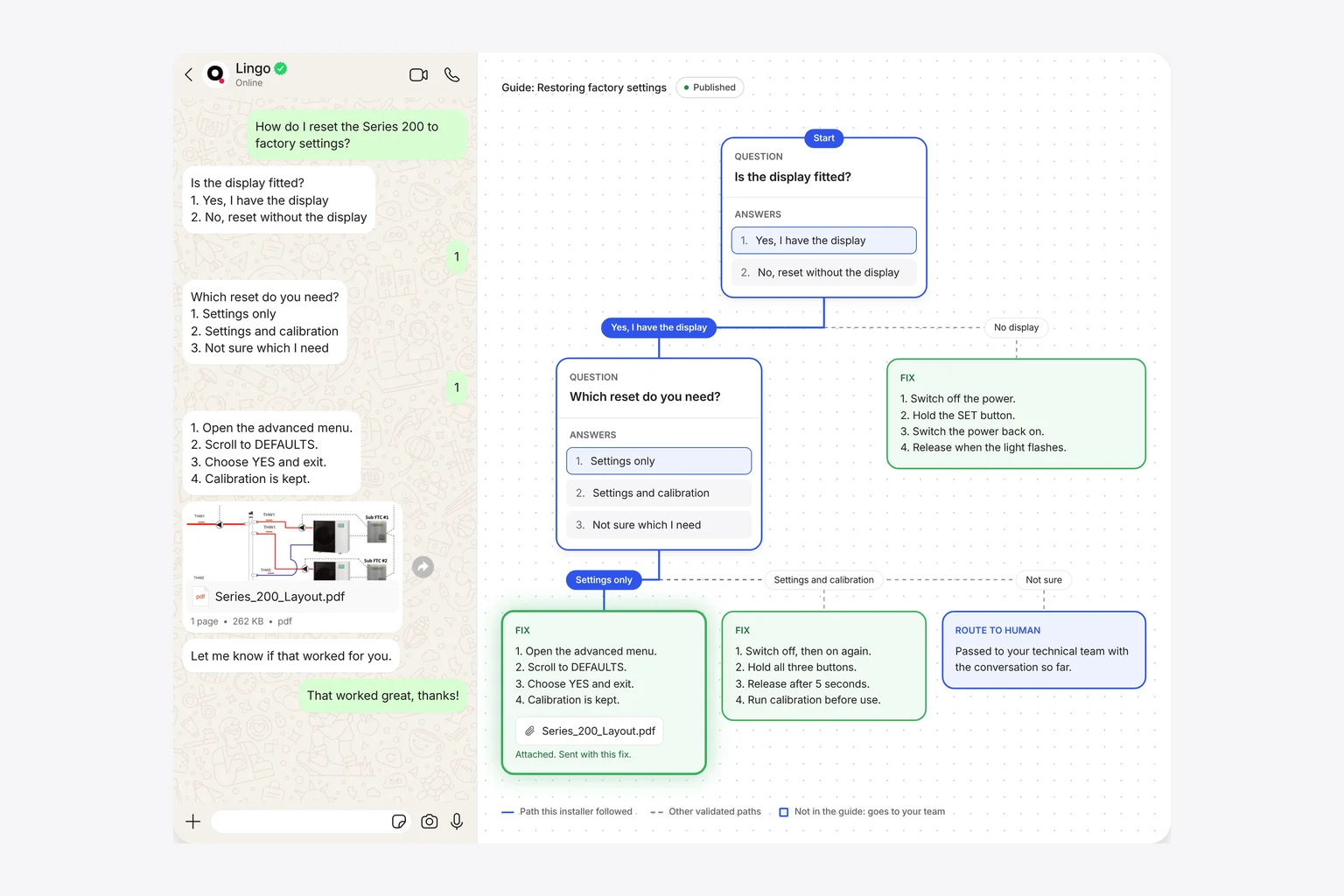
The useful way to think about the two is as one body of documentation used in two ways. The manuals, bulletins and drawings stay in the knowledge base, where they are maintained and where people go to read them. Guided paths are built from them for the questions that need doing rather than reading, and each step can point back to the page it came from.
One set of documents, used two ways
There is a second benefit. A knowledge base can tell you which pages were opened, but not whether the reader found what they needed. A guide knows where each installer stopped, what they chose and which questions it had to pass to a person, which is a precise list of where the documentation is unclear.
Lingo builds guided paths from a manufacturer’s own manuals and bulletins, and the technical team approves each one before installers see it. Read how Lingo turns a manual into a guide, or see it applied to fault codes and parameter configuration.
Sources
- Gartner survey finds only 14% of customer service issues are fully resolved in self-serviceGartner, 19 August 2024. Survey of 5,728 customers, December 2023. Customers across industries.
- How little do users read?Jakob Nielsen, Nielsen Norman Group, 5 May 2008. Analysis of browsing data from Weinreich, Obendorf, Herder and Mayer, ACM Transactions on the Web, 2008. 28% is an upper bound.
- S1000D data module typesAdobe FrameMaker documentation, accessed October 2026. The fault data module and fault isolation charts.
Questions people ask
What is the difference between a knowledge base and guided troubleshooting?
A knowledge base is a library: it holds the correct documents and lets people search and read them. Guided troubleshooting is a conversation: it asks one question at a time about what the installer can see, and gives the next documented step for that answer. The first is built for finding information, the second for acting on it.
Why do installers still ring when the manuals are online?
Because finding the right page, for the right variant, on a phone, on site, is slower than ringing. In a Gartner survey of 5,728 customers published in August 2024, only 14% of service issues were fully resolved in self-service, and in 43% of cases customers could not find content relevant to their issue.
Does guided troubleshooting replace a knowledge base?
No. The guides are built from the same manuals and bulletins, so the documentation stays the source of truth. Reference material such as datasheets, certificates and parts lists is still best kept in a library people can browse and search.
Which support questions suit guided troubleshooting best?
Questions where the answer depends on what the installer is looking at and the order of steps matters: fault codes, commissioning, parameter settings for a particular variant, wiring and safety device checks.